Lab 6
Introduction
For this project, an STM32L432KC microcontroller was paired with an ESP8266 Mikroe Click Board and a DS1722 temperature sensor in order to create a user-interactive website that would adjust the resolution of the temperature readings at the user’s request.
Design and Testing Methodology
The overall approach here was utilizing the SPI and UART pins on our main MCU, the STM32, in order to communicate with the DS1722 and ESP8266, respectively. UART would send the HTML needed to create the website to the ESP8266 and send user requests and read data from the DS1722 over SPI.

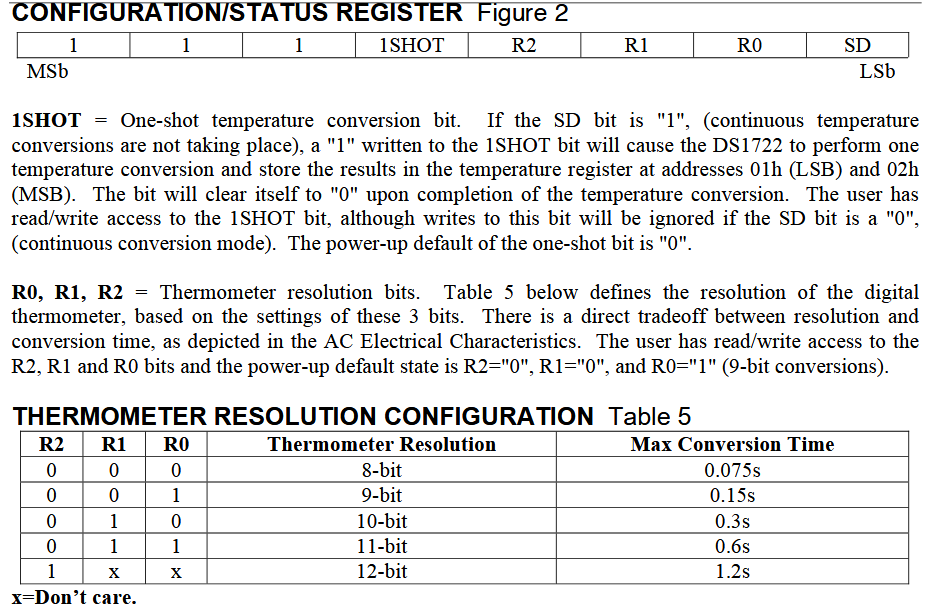
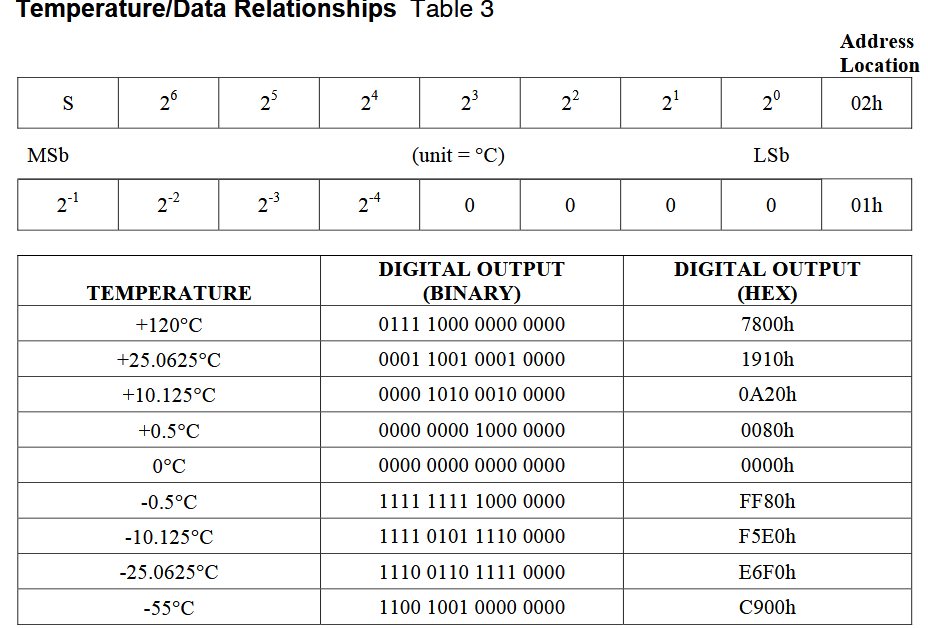
The readTemp() and setResolution() functions were utilized to set data resolution via the configuration register and read the MSB (most significant byte) and LSB (least significant byte) from their respective addresses (described in Figure 1). According to the user’s request, the configuration register (0x80) would be written to using the setResolution() function. In order to do so, the spiSendReceive() function was used to send the correct 8-bit value that aligns with the desired resolution, as shown in Figure 2. As for reading, the readTemp() called on spiSendReceive to first send the correct addresses we want to read from (0x01 and 0x02, as depicted in Figure 1), then send dummy bytes containing 0x00 to allow the DS1722 to respond with the temperature data. The data from 0x01 (LSB) and the data from 0x02 (MSB) were both read, concatenated into a single 16-bit number, then divided by 256 to give us the data’s corresponding temperature value according to the relationships shown in Figure 3.
As for the UART, a basic block of HTML code was sent to the ESP8266 to create the body and user-interactable buttons of the webpage and cast it over Wi-Fi. In the main function, a while(1) loop was utilized in order to keep checking for user resolution requests, only reading the new temperature and displaying the updated value on the webpage when a new request is sent using the sendString() UART function.
Technical Documentation:
The Git repository containing the source code of this lab can be found here: Lab 6 Repo.
Oscilliscope Traces of SPI Transactions
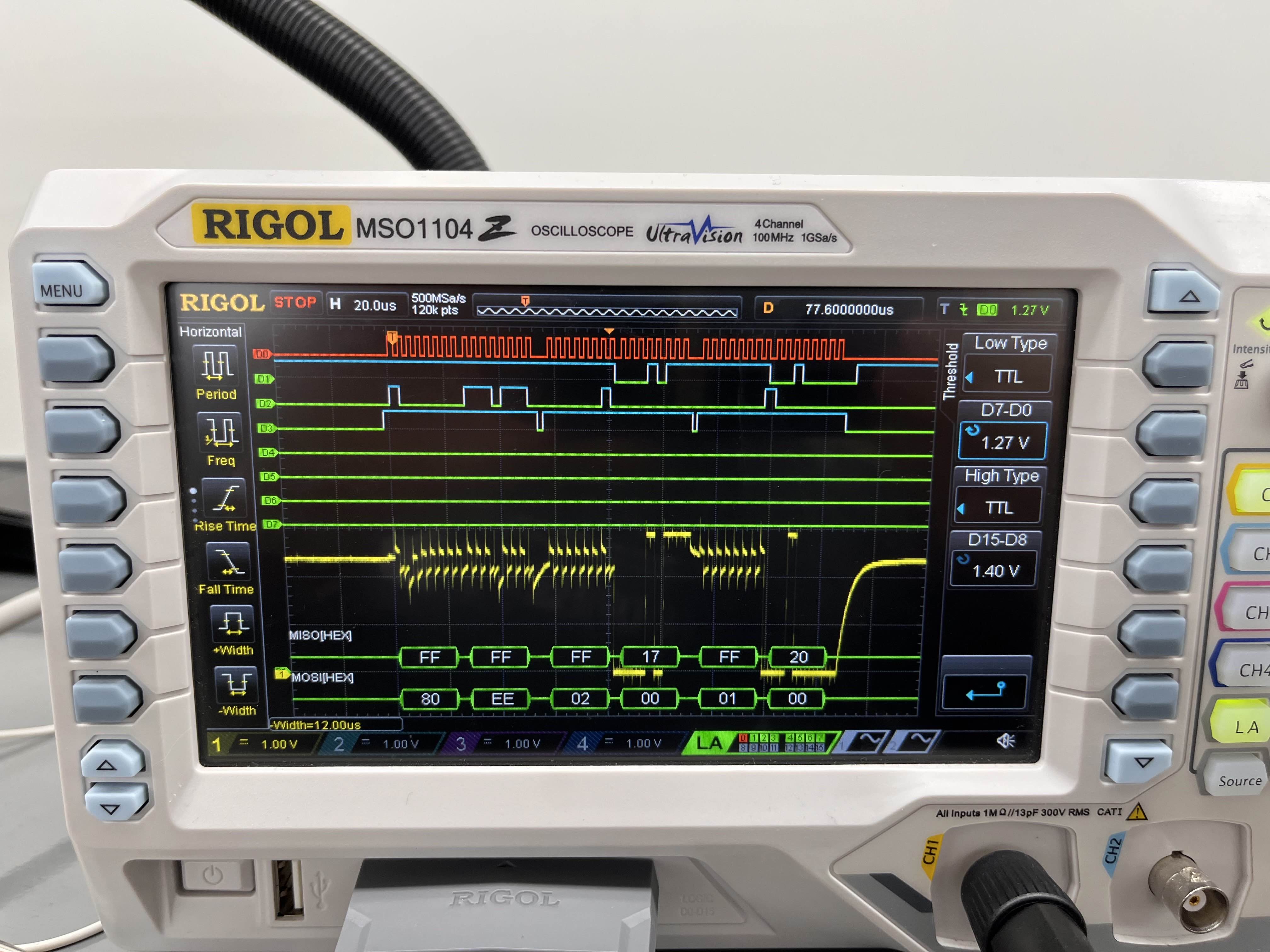
As seen in the figure above, there was a successful SPI transaction that was triggered by a user input from the webpage!
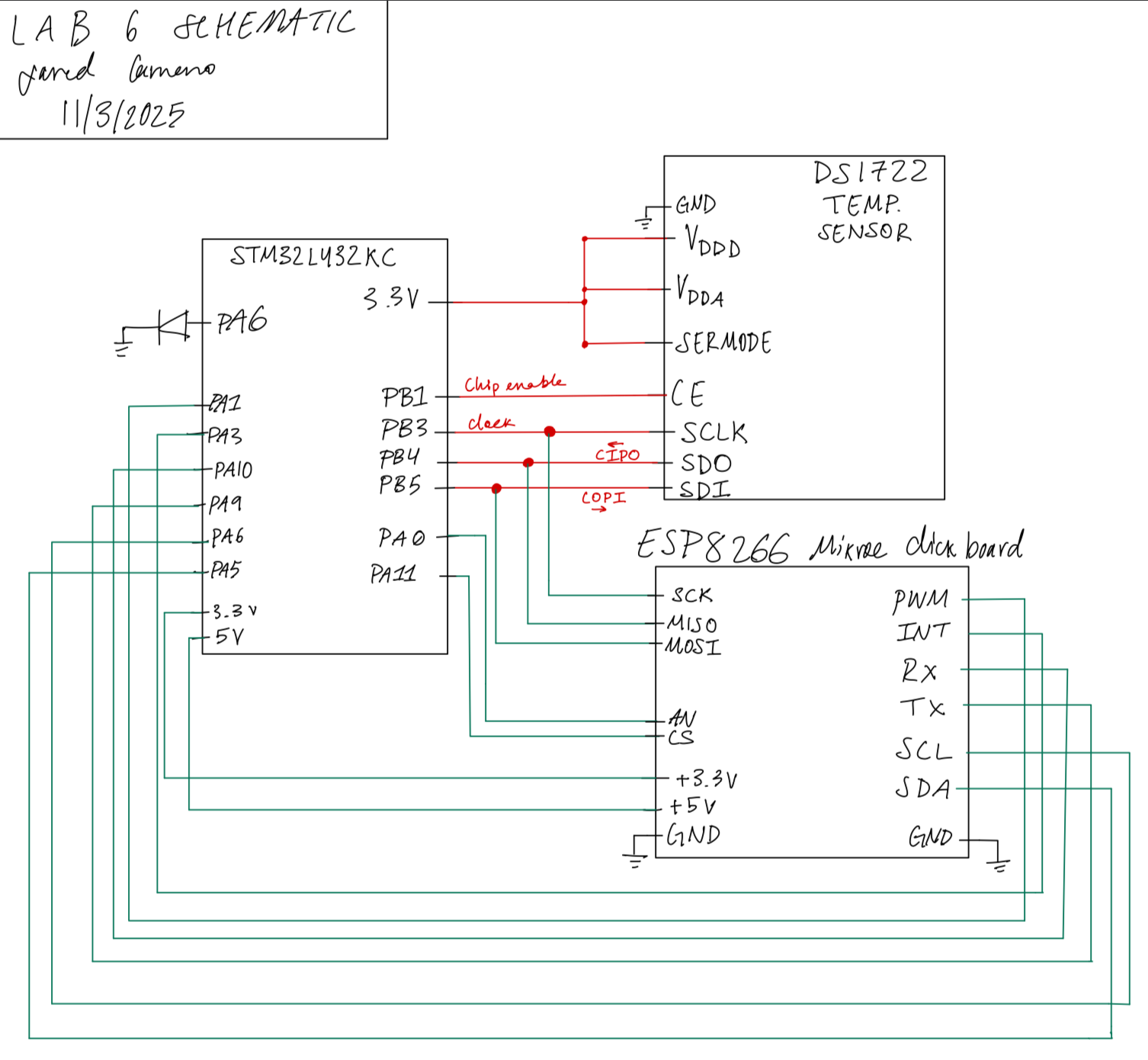
Schematic
Results and Discussion
Conclusion
Overall, this lab was successful given that it was able to read temperatures and update in response to user requests.
AI Prototype Summary
The AI produced a very pretty looking website, but the value on the website would randomly update itself while nothing was connected. As for the code for reading temperature, it is trying to read the LSB and MSB from the same address, which is incorrect, and it also got the address of the LSB incorrect (0x81 instead of 0x01).
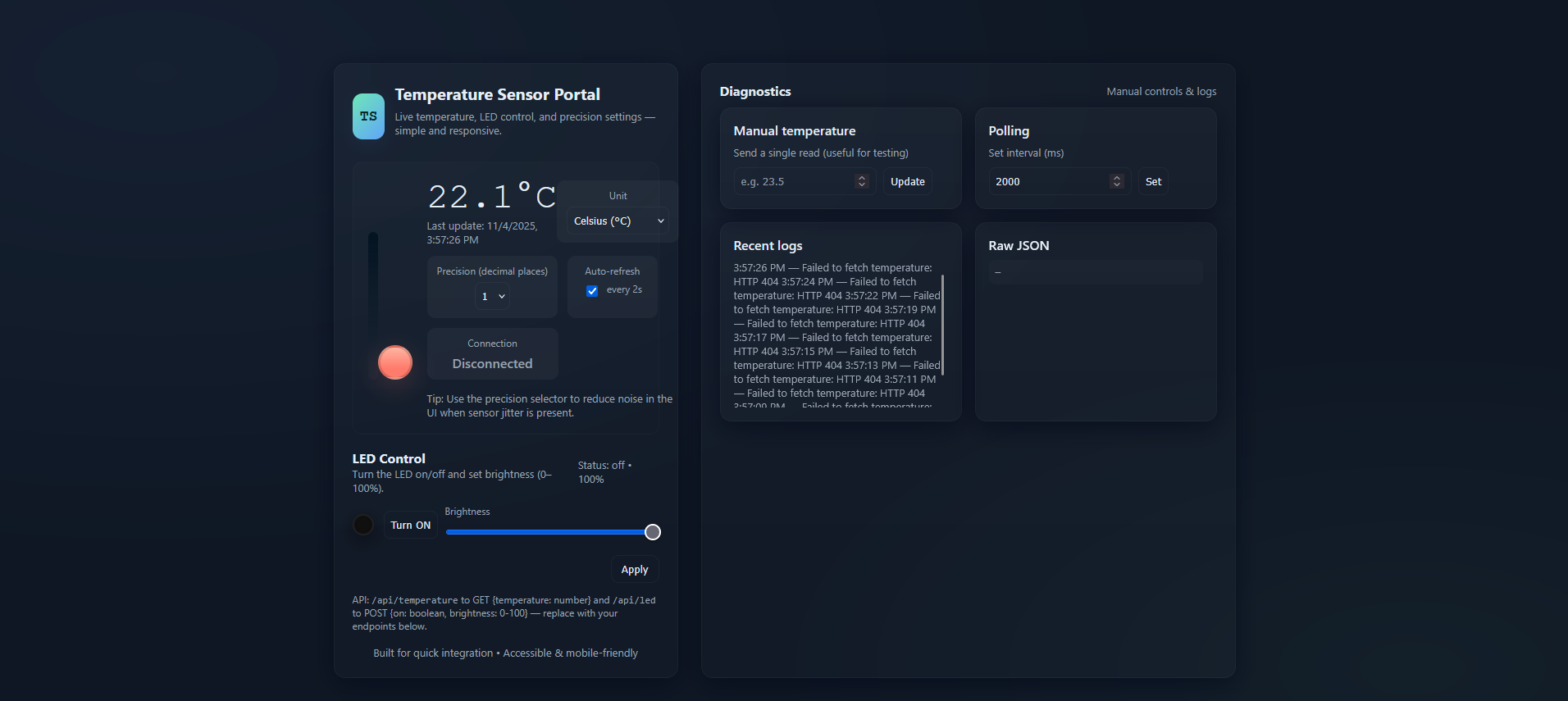
Corresponding HTML code
<!doctype html>
<html lang="en">
<head>
  <meta charset="utf-8" />
  <meta name="viewport" content="width=device-width,initial-scale=1" />
  <title>Temperature Sensor Portal</title>
  <meta name="description" content="Web portal to show temperature, control LED, and choose precision" />
  <style>
    :root{
      --bg:#0f1724;
      --card:#0b1220;
      --muted:#9aa4b2;
      --accent:#6ee7b7; /* mint */
      --accent-2:#60a5fa; /* blue */
      --glass: rgba(255,255,255,0.04);
      --success:#10b981;
      --danger:#fb7185;
      --radius:14px;
      --mono: ui-monospace, SFMono-Regular, Menlo, Monaco, "Roboto Mono", "Segoe UI Mono", "Courier New", monospace;
      color-scheme: dark;
    }
    *{box-sizing:border-box}
    html,body{height:100%}
    body{
      margin:0;
      font-family: Inter, ui-sans-serif, system-ui, -apple-system, "Segoe UI", Roboto, "Helvetica Neue", Arial;
      background: radial-gradient(1200px 600px at 10% 10%, rgba(96,165,250,0.06), transparent), radial-gradient(800px 400px at 90% 90%, rgba(110,231,183,0.035), transparent), var(--bg);
      color:#e6eef6;
      -webkit-font-smoothing:antialiased;
      -moz-osx-font-smoothing:grayscale;
      padding:32px;
      display:flex;
      align-items:center;
      justify-content:center;
    }

    .layout{
      width:100%;
      max-width:1100px;
      display:grid;
      grid-template-columns: 420px 1fr;
      gap:28px;
    }

    .card{
      background: linear-gradient(180deg, rgba(255,255,255,0.02), rgba(255,255,255,0.01));
      border-radius:var(--radius);
      padding:22px;
      box-shadow: 0 8px 30px rgba(2,6,23,0.6);
      border:1px solid rgba(255,255,255,0.03);
    }

    header .brand{
      display:flex;gap:12px;align-items:center;margin-bottom:12px
    }
    .logo{
      width:56px;height:56px;border-radius:12px;background:linear-gradient(135deg,var(--accent),var(--accent-2));display:flex;align-items:center;justify-content:center;font-weight:700;color:#052a2a;font-family:var(--mono);font-size:18px;box-shadow:0 6px 20px rgba(96,165,250,0.08);
    }
    h1{font-size:20px;margin:0}
    p.lead{margin:6px 0 18px;color:var(--muted);font-size:13px}

    /* Temperature big panel */
    .thermo{
      display:flex;gap:18px;align-items:center;padding:18px;border-radius:12px;background:linear-gradient(180deg, rgba(255,255,255,0.01), transparent);border:1px solid rgba(255,255,255,0.02);
    }
    .thermo .meter{
      width:110px;height:220px;position:relative;display:flex;align-items:end;justify-content:center;padding-bottom:10px
    }
    .bulb{
      width:42px;height:42px;background:linear-gradient(180deg,#ffb4a2 0%, #ff7b6b 70%);border-radius:50%;box-shadow:0 8px 30px rgba(255,123,107,0.2);border:3px solid rgba(0,0,0,0.15);
    }
    .scale{
      width:12px;height:180px;background:linear-gradient(180deg,#031321 0%, rgba(255,255,255,0.02) 100%);border-radius:8px;padding:6px;display:flex;flex-direction:column;align-items:center;justify-content:flex-end
    }
    .mercury{
      width:100%;background:linear-gradient(180deg,var(--accent-2), var(--accent));border-radius:6px;transition:height 600ms cubic-bezier(.2,.9,.2,1), background 400ms;
    }

    .info{
      flex:1;display:flex;flex-direction:column;gap:8px
    }
    .tempBig{font-family:var(--mono);font-size:44px;margin:0}
    .tempSmall{color:var(--muted);font-size:13px}

    .controls{display:flex;gap:12px;margin-top:12px;flex-wrap:wrap}
    .control{background:var(--glass);border-radius:10px;padding:10px 12px;min-width:110px;text-align:center}
    .control label{display:block;font-size:12px;color:var(--muted);margin-bottom:6px}
    .control .value{font-weight:600;font-size:16px}

    .row{display:flex;gap:12px}

    /* LED card */
    .led-panel{display:flex;flex-direction:column;gap:12px}
    .led-visual{display:flex;align-items:center;gap:12px}
    .led-dot{width:26px;height:26px;border-radius:999px;box-shadow:0 6px 24px rgba(0,0,0,0.6), 0 0 18px rgba(0,0,0,0.2) inset;border:2px solid rgba(255,255,255,0.06);transition:transform 220ms}
    .led-dot.on{box-shadow:0 10px 40px rgba(96,165,250,0.18), 0 0 20px rgba(96,165,250,0.18);transform:scale(1.05)}

    input[type=range]{width:100%}
    select,input[type=number],button{background:transparent;border:1px solid rgba(255,255,255,0.04);padding:8px;border-radius:8px;color:inherit}
    button{cursor:pointer}

    /* right column */
    .panel-list{display:grid;grid-template-columns:repeat(2,1fr);gap:16px}

    .card.small{padding:16px}
    .muted{color:var(--muted);font-size:13px}

    footer{margin-top:16px;color:var(--muted);font-size:13px;text-align:center}

    /* responsiveness */
    @media (max-width:980px){
      .layout{grid-template-columns:1fr;max-width:760px}
      .thermo{flex-direction:row}
    }
  </style>
</head>
<body>
  <div class="layout">
    <section class="card">
      <header>
        <div class="brand">
          <div class="logo">TS</div>
          <div>
            <h1>Temperature Sensor Portal</h1>
            <p class="lead">Live temperature, LED control, and precision settings — simple and responsive.</p>
          </div>
        </div>
      </header>

      <div class="thermo" role="region" aria-label="Temperature status">
        <div class="meter" aria-hidden="true">
          <div class="scale">
            <div id="mercury" class="mercury" style="height:30%"></div>
          </div>
          <div style="margin-top:10px;display:flex;justify-content:center;width:100%">
            <div class="bulb"></div>
          </div>
        </div>

        <div class="info">
          <div>
            <div style="display:flex;align-items:center;justify-content:space-between">
              <div>
                <div class="tempBig" id="tempValue">--.-°C</div>
                <div class="tempSmall" id="tempHint">Last update: —</div>
              </div>
              <div style="text-align:right">
                <div class="control" style="min-width:140px">
                  <label for="unitSelect">Unit</label>
                  <select id="unitSelect" aria-label="Select temperature unit">
                    <option value="C">Celsius (°C)</option>
                    <option value="F">Fahrenheit (°F)</option>
                  </select>
                </div>
              </div>
            </div>

            <div class="controls">
              <div class="control">
                <label for="precision">Precision (decimal places)</label>
                <select id="precision">
                  <option value="0">0</option>
                  <option value="1" selected>1</option>
                  <option value="2">2</option>
                  <option value="3">3</option>
                </select>
              </div>

              <div class="control">
                <label>Auto-refresh</label>
                <div style="display:flex;gap:8px;align-items:center;justify-content:center">
                  <input type="checkbox" id="autoRefresh" checked />
                  <label for="autoRefresh" class="muted">every 2s</label>
                </div>
              </div>

              <div class="control" style="min-width:160px">
                <label>Connection</label>
                <div class="value" id="connStatus">Disconnected</div>
              </div>

            </div>
          </div>

          <div style="margin-top:6px;color:var(--muted);font-size:13px">Tip: Use the precision selector to reduce noise in the UI when sensor jitter is present.</div>

        </div>
      </div>

      <div style="margin-top:18px" class="led-panel">
        <div style="display:flex;justify-content:space-between;align-items:center">
          <div>
            <div style="font-weight:700">LED Control</div>
            <div class="muted">Turn the LED on/off and set brightness (0–100%).</div>
          </div>
          <div id="ledInfo" class="muted">Status: off</div>
        </div>

        <div class="led-visual">
          <div id="ledDot" class="led-dot" style="background:#111"></div>
          <div style="flex:1">
            <div style="display:flex;gap:8px;align-items:center">
              <button id="ledToggle">Turn ON</button>
              <div style="flex:1">
                <label for="brightness" style="display:block;font-size:12px;color:var(--muted);margin-bottom:6px">Brightness</label>
                <input type="range" id="brightness" min="0" max="100" value="100" />
              </div>
            </div>
          </div>
        </div>

        <div style="display:flex;gap:8px;justify-content:flex-end">
          <button id="applyLed" style="padding:8px 12px;border-radius:10px">Apply</button>
        </div>

        <div class="muted" style="font-size:12px">API: <code>/api/temperature</code> to GET {temperature: number} and <code>/api/led</code> to POST {on: boolean, brightness: 0-100} — replace with your endpoints below.</div>
      </div>

      <footer>
        <div>Built for quick integration • Accessible & mobile-friendly</div>
      </footer>
    </section>

    <aside class="card">
      <div style="display:flex;justify-content:space-between;align-items:center;margin-bottom:10px">
        <div style="font-weight:700">Diagnostics</div>
        <div style="font-size:13px;color:var(--muted)">Manual controls & logs</div>
      </div>

      <div class="panel-list">
        <div class="card small">
          <div style="font-weight:600">Manual temperature</div>
          <div class="muted" style="margin-top:8px">Send a single read (useful for testing)</div>
          <div style="margin-top:10px;display:flex;gap:8px">
            <input id="manualTemp" type="number" placeholder="e.g. 23.5" />
            <button id="sendManual">Update</button>
          </div>
        </div>

        <div class="card small">
          <div style="font-weight:600">Polling</div>
          <div class="muted" style="margin-top:8px">Set interval (ms)</div>
          <div style="margin-top:10px;display:flex;gap:8px">
            <input id="pollInterval" type="number" value="2000" />
            <button id="setPoll">Set</button>
          </div>
        </div>

        <div class="card small">
          <div style="font-weight:600">Recent logs</div>
          <div id="logs" class="muted" style="margin-top:8px;max-height:180px;overflow:auto;font-size:13px">No logs yet.</div>
        </div>

        <div class="card small">
          <div style="font-weight:600">Raw JSON</div>
          <pre id="raw" style="font-size:12px;margin:8px 0;max-height:160px;overflow:auto;background:rgba(255,255,255,0.02);padding:8px;border-radius:8px;color:var(--muted)">—</pre>
        </div>
      </div>
    </aside>
  </div>

  <script>
    /* Configuration: point these to your real endpoints. */
    const CONFIG = {
      tempEndpoint: '/api/temperature', // GET -> { temperature: number }
      ledEndpoint: '/api/led', // POST -> { on: boolean, brightness: number }
      fallbackMock: true, // if true, UI will simulate values when endpoints fail
    };

    const el = id => document.getElementById(id);
    const tempValueEl = el('tempValue');
    const tempHintEl = el('tempHint');
    const mercuryEl = el('mercury');
    const connStatusEl = el('connStatus');
    const rawEl = el('raw');
    const logsEl = el('logs');
    const ledDot = el('ledDot');
    const ledInfo = el('ledInfo');

    let pollInterval = Number(el('pollInterval').value) || 2000;
    let timer = null;
    let precision = Number(el('precision').value);
    let unit = el('unitSelect').value;
    let autoRefresh = el('autoRefresh').checked;
    let mockTemp = 22 + Math.random()*2;

    function log(msg){
      const now = new Date().toLocaleTimeString();
      logsEl.textContent = `${now} — ${msg}\n` + logsEl.textContent;
    }

    function setConn(connected){
      connStatusEl.textContent = connected ? 'Connected' : 'Disconnected';
      connStatusEl.style.color = connected ? 'var(--success)' : 'var(--muted)';
    }

    function formatTemp(val){
      if (unit === 'F') val = val * 9/5 + 32;
      return Number(val).toFixed(precision) + '°' + unit;
    }

    function updateUI(temp){
      const display = formatTemp(temp);
      tempValueEl.textContent = display;
      tempHintEl.textContent = 'Last update: ' + new Date().toLocaleString();

      // map temp to 0..100% for mercury (assumes -10..50C sensor range)
      const celsius = unit === 'F' ? (temp - 32) * 5/9 : temp;
      const pct = Math.min(100, Math.max(0, ((celsius + 10)/60) * 100));
      mercuryEl.style.height = pct + '%';
      // color shift based on value
      if (pct > 66) mercuryEl.style.background = 'linear-gradient(180deg,#ff9b6b,#ff6b6b)';
      else if (pct > 33) mercuryEl.style.background = 'linear-gradient(180deg,#f6d365,#fda085)';
      else mercuryEl.style.background = 'linear-gradient(180deg,var(--accent-2), var(--accent))';
    }

    async function fetchTemperature(){
      try{
        const r = await fetch(CONFIG.tempEndpoint, {cache:'no-store'});
        if(!r.ok) throw new Error('HTTP '+r.status);
        const json = await r.json();
        if(typeof json.temperature !== 'number') throw new Error('invalid payload');
        setConn(true);
        rawEl.textContent = JSON.stringify(json, null, 2);
        log('Temperature read: ' + json.temperature);
        return json.temperature;
      }catch(err){
        setConn(false);
        log('Failed to fetch temperature: ' + err.message);
        if(CONFIG.fallbackMock){
          // gentle simulated drift
          mockTemp += (Math.random() - 0.5) * 0.25;
          return mockTemp;
        }
        throw err;
      }
    }

    async function pollOnce(){
      try{
        const t = await fetchTemperature();
        updateUI(t);
      }catch(e){
        // handled in fetchTemperature
      }
    }

    function startPolling(){
      if(timer) clearInterval(timer);
      timer = setInterval(()=>{ if(el('autoRefresh').checked) pollOnce(); }, pollInterval);
    }

    // LED controls
    let ledState = {on:false, brightness:100};

    function paintLed(){
      if(ledState.on){
        ledDot.classList.add('on');
        const glow = Math.max(10, ledState.brightness);
        ledDot.style.background = `radial-gradient(circle at 30% 25%, rgba(255,255,255,0.18), rgba(96,165,250,0.08) 8%, rgba(0,0,0,0.15) 50%), rgba(96,165,250,0.12)`;
        ledDot.style.boxShadow = `0 10px 40px rgba(96,165,250,0.12), 0 0 ${glow/1.6}px rgba(96,165,250,0.14)`;
      }else{
        ledDot.classList.remove('on');
        ledDot.style.background = '#111';
        ledDot.style.boxShadow = '';
      }
      ledInfo.textContent = `Status: ${ledState.on ? 'on' : 'off'} • ${ledState.brightness}%`;
    }

    async function applyLed(){
      const payload = { on: ledState.on, brightness: ledState.brightness };
      try{
        const r = await fetch(CONFIG.ledEndpoint, {method:'POST',headers:{'Content-Type':'application/json'},body:JSON.stringify(payload)});
        if(!r.ok) throw new Error('HTTP '+r.status);
        const json = await r.json();
        log('LED updated → ' + JSON.stringify(payload));
        return json;
      }catch(err){
        log('Failed to update LED: ' + err.message + (CONFIG.fallbackMock ? ' (mock used)' : ''));
        if(CONFIG.fallbackMock) return {ok:true};
        throw err;
      }
    }

    // UI wiring
    el('precision').addEventListener('change', e => { precision = Number(e.target.value); log('Precision set to ' + precision); pollOnce(); });
    el('unitSelect').addEventListener('change', e => { unit = e.target.value; pollOnce(); });
    el('autoRefresh').addEventListener('change', e => { autoRefresh = e.target.checked; log('Auto-refresh ' + (autoRefresh? 'enabled':'disabled')); });

    el('sendManual').addEventListener('click', ()=>{
      const v = Number(el('manualTemp').value);
      if(Number.isFinite(v)){ updateUI(v); rawEl.textContent = JSON.stringify({temperature:v}, null, 2); log('Manual temperature set: ' + v); }
    });

    el('setPoll').addEventListener('click', ()=>{
      const v = Number(el('pollInterval').value);
      if(v > 200){ pollInterval = v; startPolling(); log('Polling interval set to ' + v + ' ms'); }
    });

    el('brightness').addEventListener('input', e => { ledState.brightness = Number(e.target.value); paintLed(); });
    el('ledToggle').addEventListener('click', ()=>{ ledState.on = !ledState.on; el('ledToggle').textContent = ledState.on ? 'Turn OFF' : 'Turn ON'; paintLed(); });
    el('applyLed').addEventListener('click', async ()=>{ await applyLed(); });

    // init
    paintLed();
    startPolling();
    pollOnce();

    // convenience: keyboard shortcuts
    document.addEventListener('keydown', e=>{
      if(e.key === 'r' && (e.ctrlKey||e.metaKey)) { e.preventDefault(); pollOnce(); log('Manual refresh (shortcut)'); }
    });

    // expose for debugging
    window.__tsPortal = {pollOnce, applyLed, setConn};

  </script>
</body>
</html>
ChatGPT’s C implementation
#include "stm32l432xx.h"
#include <stdint.h>

#define DS1722_CMD_READ_TEMP_MSB  0x02
#define DS1722_CMD_WRITE_CONFIG   0x80
#define DS1722_CMD_READ_CONFIG    0x81

// Pin definitions (PB3=SCK, PB4=MISO, PB5=MOSI, PB1=CE)
#define DS1722_CE_PORT    GPIOB
#define DS1722_CE_PIN     (1U << 1)

// Simple macros for CE control
static inline void DS1722_CE_Low(void)  { DS1722_CE_PORT->BSRR = (uint32_t)DS1722_CE_PIN << 16U; }
static inline void DS1722_CE_High(void) { DS1722_CE_PORT->BSRR = DS1722_CE_PIN; }

/**
 * @brief  Initialize SPI1 peripheral and GPIO pins for DS1722 communication.
 */
void DS1722_SPI_Init(void)
{
    // Enable GPIOB and SPI1 clocks
    RCC->AHB2ENR |= RCC_AHB2ENR_GPIOBEN;
    RCC->APB2ENR |= RCC_APB2ENR_SPI1EN;

    // ---- GPIO Config ----
    // PB3 (SCK), PB4 (MISO), PB5 (MOSI) -> AF5 (SPI1)
    GPIOB->MODER &= ~((3U<<(3*2)) | (3U<<(4*2)) | (3U<<(5*2)));  // Clear mode bits
    GPIOB->MODER |=  ((2U<<(3*2)) | (2U<<(4*2)) | (2U<<(5*2)));  // Alternate function mode
    GPIOB->AFR[0] &= ~((0xF<<(3*4)) | (0xF<<(4*4)) | (0xF<<(5*4)));
    GPIOB->AFR[0] |=  ((5U<<(3*4)) | (5U<<(4*4)) | (5U<<(5*4))); // AF5 = SPI1
    GPIOB->OSPEEDR |= ((3U<<(3*2)) | (3U<<(4*2)) | (3U<<(5*2))); // Very high speed
    GPIOB->PUPDR &= ~((3U<<(3*2)) | (3U<<(4*2)) | (3U<<(5*2)));  // No pull
    GPIOB->OTYPER &= ~((1U<<3) | (1U<<4) | (1U<<5));             // Push-pull

    // PB1 -> CE pin, general-purpose output
    GPIOB->MODER &= ~(3U<<(1*2));
    GPIOB->MODER |=  (1U<<(1*2));     // Output mode
    GPIOB->OSPEEDR |= (3U<<(1*2));    // High speed
    DS1722_CE_High();                 // Deselect initially

    // ---- SPI1 Config ----
    SPI1->CR1 = 0; // Reset control register

    // SPI mode: Master, software NSS, 8-bit, CPOL=0, CPHA=0 (Mode 0)
    SPI1->CR1 |= SPI_CR1_MSTR | SPI_CR1_SSI | SPI_CR1_SSM;

    // Baud rate prescaler: fPCLK/16 (adjust as needed)
    SPI1->CR1 |= SPI_CR1_BR_1;

    // Enable SPI1
    SPI1->CR1 |= SPI_CR1_SPE;
}

/**
 * @brief Perform a full-duplex SPI transfer (blocking).
 * @param tx_byte Byte to send
 * @return Received byte
 */
static uint8_t DS1722_SPI_Transfer(uint8_t tx_byte)
{
    while (!(SPI1->SR & SPI_SR_TXE));        // Wait for TX buffer empty
    *((__IO uint8_t *)&SPI1->DR) = tx_byte;  // Write data
    while (!(SPI1->SR & SPI_SR_RXNE));       // Wait for RX ready
    return *((__IO uint8_t *)&SPI1->DR);     // Return received data
}

/**
 * @brief Read temperature from DS1722.
 * @return Temperature in Celsius.
 */
float DS1722_ReadTemperature(void)
{
    uint8_t msb, lsb;
    uint16_t raw;

    DS1722_CE_Low();

    DS1722_SPI_Transfer(DS1722_CMD_READ_TEMP_MSB); // Send read command
    msb = DS1722_SPI_Transfer(0x00);               // Read MSB
    lsb = DS1722_SPI_Transfer(0x00);               // Read LSB

    DS1722_CE_High();

    raw = ((uint16_t)msb << 8) | lsb;

    return ((float)raw) / 256.0f; // 1 LSB = 1/256 °C
}

/**
 * @brief Configure DS1722 for continuous conversion mode.
 */
void DS1722_Configure(void)
{
    // Configuration: continuous conversion, 12-bit resolution (0xEE)
    // Bit7=1 to write config
    uint8_t config = 0xEE;

    DS1722_CE_Low();
    DS1722_SPI_Transfer(DS1722_CMD_WRITE_CONFIG);
    DS1722_SPI_Transfer(config);
    DS1722_CE_High();
}